

Last Modified: 10/18/2026
Affiliate Disclaimers /Disclosure & Terms & Conditions: This blog is reader supported and this contains affiliate/referral links. If you book or buy through these links, I may earn a commission or referral bonus. As an Amazon Associate I earn from qualifying purchases.
I have started and quit three blogs… This one is different
Before Lattes & Layovers, I had a cooking blog, a family blog, and a lifestyle blog. I quit all three. Between work and little babies, I was too tired and got bored writing about “chores”.
But this one is fun. I get to write about travel and points and miles; I have actual time now, and I set it up properly from day one instead of winging it.
This post lays out the exact setup I used, step by step, including what everything cost. If you’re thinking about starting a travel blog, here’s what I did to get started.
This post is part of my Blogging About Blogging series, where I share this blog’s real traffic, costs, and income every quarter.
How I started a travel blog, step by step
Step 1: Niche & Name (Free)
My niche is travel, with a heavy side of points and miles, aimed mostly at moms traveling with teens. I didn’t think I needed a clever angle, but I wanted a topic I would still be interested in years from now.
My kids will eventually go to college and start their own lives, so I want something I can work on while I’m traveling between our visits. Plus, I plan to retire early in the next 2-3 years, and I would love a little extra income to support my travel hobby.
Tip: Before you settle on a blog name, check that the .com and the Instagram handle are available before you fall in love with a name.
Step 2: Domain (~$22)
I bought lattes-and-layovers.com from GoDaddy for $22 for the first year. Some blog platforms include a domain for the first year.
Tip: They will probably try to upsell a personal email account that matches your blog. I chose a free Gmail account for now.
Step 3: Business Status with an LLC (~$200)
I’m not a lawyer, and this is not legal advice.
But I formed an LLC for the blog for a few reasons. It cost $200 in filing fees yearly but was pretty easy to set up. I wanted to keep the business separate from my personal money, and I wanted to leverage my business status to apply for points-and-miles business credit cards.
Tip: Check with a professional. I’m sure plenty of bloggers don’t have an LLC, but I sleep a bit better when all the legal stuff is tucked away.
Tip: For the added benefit of applying for business credit cards, I also applied for an EIN with my LLC.
Step 4: WordPress Host + Theme ($49/month + $550 one time)
This blog runs on Showit and WordPress. There are a lot of free themes, but I went with a Showit theme from Lennox Creative Co. The theme was $550 one-time, and Showit hosting runs $49 a month.
Could I have used a free theme? Yes. Would it look like this? Probably not. I really wanted this site to look professional. If your budget is tight, start with a free theme and upgrade later.
My previous blogs were on WordPress, and I found it challenging to get the style and functionality I wanted. Showit is nice because it is very user-friendly, and I was able to modify the theme easily. Both Showit and Lennox Creative provided video instructions that made getting started pretty straightforward.
Early on, I had a few hiccups, and both Lennox Creative and Showit were super helpful in resolving the issue through chat and email (with a real person!).
Showit {Affiliate Link} for the first month free!
Showit Sunchaser Theme from Lennox Creative Co {Affiliate Link} 10% off with code LATTES10
Step 5: Legal Pages ($267)
Before I published a single post with links, I bought legal templates for $267 from The Contract Shop: a privacy policy, terms and conditions, and a disclaimers page.
Because I am using affiliate links and collect email addresses, I need these. It’s the least fun $267 I have ever spent, and I’d spend it again.
The Contract Shop {Affiliate Link}
Step 6: Canva for Graphics ($18/month)
Nearly every graphic on this site and on my Instagram & Pinterest is made in Canva. It’s $18 a month, and it’s the tool I open most after WordPress itself. I use it to create Pinterest pins, Instagram carousels, and blog post graphics. The free version works fine to start. But the Pro plan includes a brand kit and a larger photo library.
Canva {affiliate link pending}
Step 7: Google Analytics & Search Console
Before publishing a post, I set up Google Analytics and Search Console. But looking at analytics for a blog with no readers is a special kind of humbling.
Google Analytics tells you how many people visited and where they came from.
Search Console tells you what Google searches your posts are showing up in.
These two free tools let me create my quarterly reports. Because I set them up on day one, I have clean data from the very beginning: 1,141 Google impressions and 128 readers in my first three months.
Tip: Because I use the free Gmail for my blog email, it was easy to find the Google Analytics and Search Console links and set them up. Plus, they send me emails once a month to check the stats.
Step 8: Yoast SEO Plugin (free version)
The Yoast WordPress plugin helps me with my SEO titles, meta descriptions, and readability checks on every post. I’ve only ever used the free version. I’ve been really digging into learning SEO to improve my posts, and Yoast has been a good option for me as a beginner.
Step 9: Insurance ($38/month)
I carry business insurance that covers the blog for $38 a month. I did have a hard time finding errors & omissions small business insurance specifically for content creation. I went with BiBerk because they ahve a policy specifically for content creation and the process was pretty easy.
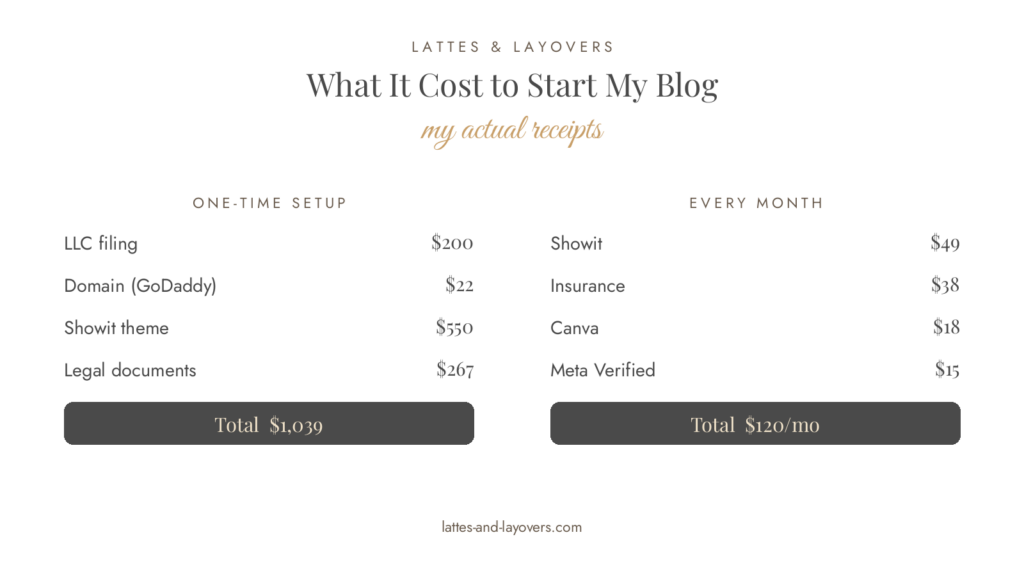
The real total: What it cost me to start a blog?
One-time setup:
- LLC filing: $200
- Domain: $22
- Showit theme: $550
- Legal documents: $267
- Total: $1,039
Every month:
- Showit: $49
- Insurance: $38
- Canva: $18
- Meta Verified: $15
- Total: $120 a month
Could I have started a blog for less? Absolutely!
A domain, basic hosting, and a free theme would get me a live blog for well under $100 a year. Everything else set me up so future me will thank me. I wanted to start with a solid design and a good legal and business structure, and I think it was worth the initial investment.
My monetizing plan
I had always assumed people monetize a blog after it gets traffic. But I set mine up at the start, before I’d earned a cent, because going back and adding links to old posts later sounds miserable.
Here’s the order I am working on:
Join affiliate programs early
I signed up for three in my first months.
Amazon Associates {Affiliate Link pending for the gear I’d use.
Stay22 {Affiliate Link} and TravelPayouts {Affiliate Link} for hotels, flights, tours, trains, and transfers.
I’m still working on how to best incorporate these into my posts, balancing monetization without being overwhelming to readers.
I put disclosures on every post
As soon as a post has an affiliate link, it needs a disclosure readers can actually see. My legal templates came with the wording, and Amazon has its own required sentence that has to sit near their links.
Advertisements Later
Display ads come later, and they follow an order. Google AdSense is the usual first step once your blog has real content and finished legal pages.
After that, most small travel blogs aim for Journey by Mediavine, which opens at 1,000 sessions a month. I’m at about 100 sessions a month and hopefully will reach that at some point in 2027.
I recommend things I actually use
I don’t plan to recommend hotels that I didn’t actually stay at or tools I don’t actually use. If a tool is on my monthly bill anyway, recommending it costs me nothing, and it might actually help someone and earn me a small commission.
Money isn’t coming anytime soon, and that is okay
My first three months of monetization earned zero, which you can verify in my Q3 2026 report. Setting this up early isn’t about earning now. It’s about building a framework for when I do get consistent readers (ie passive income).
How to start a travel blog- Questions
How much does it cost to start a blog?
It cost me $1,039 to set up and $120 a month to run, but you can start lean for under $100 a year.
Do you need an LLC to start a blog?
I’m not a lawyer; I can’t answer that for you. I formed one because I wanted the blog’s finances separate from day one.
How long does it take to make money from a travel blog?
I can only tell you my numbers: three months in, I had earned $0.00. Come back in a year, and hopefully, I can give a more solid answer. But I think it’s pretty normal this early in the game. I share the full breakdown in my Q3 2026 report, and I’ll keep reporting every quarter.
Do I need to be technical to start a blog?
I don’t think so. I’m a public health person, not a developer. WordPress plus a theme is mostly filling in boxes, and for every problem I hit, someone on the internet had already answered it. Plus, Showit and Lennox Creative have great customer support.
Considering starting a blog?
If this post nudged you to finally start, the Blogging About Blogging hub is where I keep the whole series: this guide, the tools I use, and a new traffic and income report every quarter. The I just posted Q3 for 2026 and Q4 report lands in January.
Shoot me a message on Instagram and share your new blog when you are ready!
Keep reading
Want to explore more?
- Giverny Day Trip from Paris — my most-found post on Google, and the one getting an update next
- Points & Miles Basics — new to points and miles? Start here
- How I got started with points and miles — the longer version of how I fell into this hobby
- London Mother-Daughter Trip — where half of those twelve London post ideas came from
exploring:
